Search This Blog

Showing posts with label Ultimaker. Show all posts

Saturday, 12 August 2017

Warping and adhesion issues

Ever since upgrading the 3D printer to the Ultimaker 2+ I've had issues with prints warping and detaching from the build plate.


Today I finally twigged what was different between before and after the upgrade. The 2+ kit came with a calibration card for bed levelling.


I've measured the thickness of the card against the thickness of the paper I used to use. The paper is 0.03mm thinner at 0.12mm thick. Not only that but the new coated card has also picked up a thin layer of plastic in places from the nozzle so the thickness is no longer consistent, at one point is was 0.20mm thick compared to the average 0.15mm. The paper, despite having been in use for two years, does not have anything attached to its surface.


I've gone back to my thinner paper calibration and the first print is still attached to the bed.

I do not use any adhesive on my glass. I keep it clean with an imitation chamois leather and very occasionally degrease it with isopropyl alcohol.


I also made a change to the design of the model to add expansion gaps so that the shrinking plastic cannot pull the full width of the model.


Friday, 4 August 2017

Filament spool spindle

If you refer back to some of my earlier posts about the Ultimaker and feeding filament, you will know that I think the friction from the spool often causes under-extrusion. I have a further idea to reduce the drag.

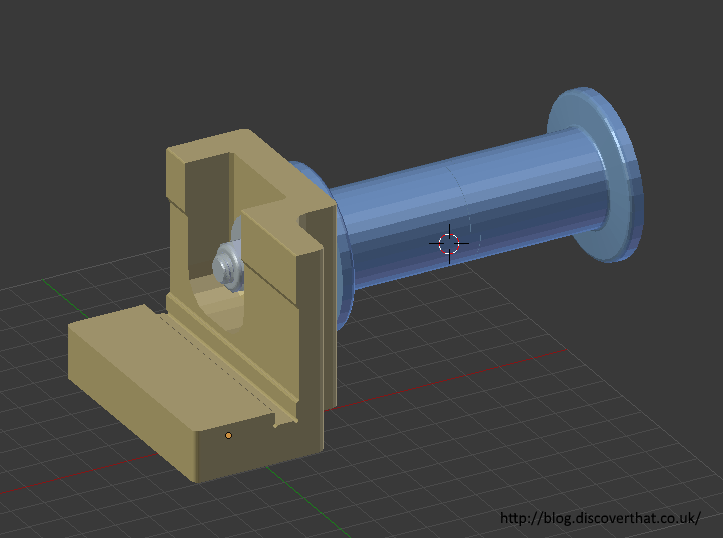
Upside down, for printing

This is a spindle for the spool with bearings in. There are loads of designs available that do the same thing. Most involve clamping the spool in some way to a spindle containing bearings.


I like to be able to easily lift the spool on and off. I see no advantage in a complex clamp. Before creating this my spools just loosely hooked on a fixed shaft. A bit looser than the original clip in spindle which is very fiddly to work with. This design is just an evolution of the hook but with bearings to make the spindle run freely.


This has worked very well the spool spins freely.

Bill of materials:
1x M8x110mm bolt
1x M8 nylon locknut
2x M8 Form A (normal) washers
1x M8x25mm or penny washer
3x 8mm axle 22mm x7mm bearings (from skates)
Optional:
2x 10mm O/D x1mm thick lengths of aluminium tube cut to fit as spacers between the bearings
The 3D printed parts:
1x Hook support (no supports needed)
1x Spacer (no supports needed)
2x Spindle halves (with supports from the bed)

==

Downloads:
Filament Spindle STL files (zip)


==

Thursday, 3 August 2017

Filament Guide Mark 6

I've now made several static guides for the back of the 3D printer.


The latest one works but I'm still nervous that the filament will stick causing under extrusion. To minimise that chance I've designed a guide that rotates using skate bearings.


I'm not claiming this is a new idea. There are loads of such things on both Thingiverse and YouMagine. None of those were quite how I wanted them or were fixed in a way I didn't want to do. I'm therefore working on my own.


This will hook under the lip at the bottom of the printer next to the power adaptor. There is no need to utilise any of the existing screws or holes on the Ultimaker.

Printed with supports for the slight lip

The bearings will hold the two halves together

Two halves interlocked

Printed in PETG

My aim is to minimise the angle at which the filament enters the feeder. I also want very low friction and minimal chance that the filament will slip out of the guide.


Bill of materials:
1x M4x40 bolt
1x M4 nylon locknut
2x M4x10 (Form C) washers
1x M4x12 repair washer
1x M8 washer behind the inner bearing over the plastic spindle
2x 8mm axle 22mm x7mm bearings (from skates)
Optional:
1x M8x1.6mm spacer between the bearings
3D printed parts:
2x pulley halves (with support from the bed)
1x Stand (no supports needed)
1x Support (no supports needed)
1x Spindle (no supports needed)

==

Downloads:
Filament Guide STL files (zip)


==

Links:
I have also made a spindle for the filament spool.

Sunday, 30 July 2017

UM2+ Under Extrusion

I've been having a lot of problems with under extrusion on larger prints. After inches of height I'll get some bands of poorly adhered fine stands before it goes back to normal.


I've been tinkering with temperature and feeder speed percentages and nothing is properly solving the problem. I had been printing some simple models in PLA at 60mm/s but perhaps it's over optimistic for that to work on every print. Slowing it down to 50mm/s has helped but I'd like to try to keep the speed up by making other adjustments, if I can.


Today I was printing in white and I noticed how many evenly spaced partial grinding marks there are on the filament.
My best guess from what I have read on the Internet is that these are likely to be caused by retraction being too frequent.

Filament Feeder Tension

As I'm mid print it is tricky to adjust retraction settings so I'm going to fiddle with the feeder tension.
This is on an Ultimaker 2+ so they come pre-set and are not supposed to need adjustment from the centre.


- One turn 

As it is only minor grinding, I've twisted the adjustment screw by one full turn clockwise. That is less pressure on the filament. The indicator moves up a tiny fraction away from the centre.


- Another turn

That's better but I still think the marks on the filament are too deep.
I'll try another turn.


From what I've read on forums and on Ultimaker's web site, if the filament is misshapen too much by the feeder it can either get stuck in the Bowden tube or in the hot end. Probably gets stuck at the isolator.

- One more turn for luck

I'm now three full clockwise turns off of centre and the marks on the filament are cleaners, showing just the even knurling and none of the grinding.


Reluctantly I've also reduced the speed of the print and at last I appear to be getting better layer adhesion.


I'm printing at 26% infill so I don't think that helps. At 30mm/s it's now feeding better.

==

Update: 1 August 2017

I spoke too soon. I was still getting under-extrusion just not for the same reason.

I'm fairly sure that the friction as the filament gets closer to the centre of the reel is still the cause of intermittent poor layer quality. I can either go back to using only cut lengths of filament, which is what I've done for years or I can use bearings for the the guides, axles or stands, as others do.

I'll have a look at what's available.

...

I fixed this by using bearings, see my article:
http://blog.discoverthat.co.uk/2017/08/filament-spool-spindle.html


==

Monday, 24 July 2017

Lower filament guide

I have found that the filament on my Ultimaker 2 flows best if it runs under the power adaptor socket.
This must make the angle better for the approach in to the feeder.


I have never been keen on that. Although I doubt there is much strain on the socket it does not look like a good idea.


To resolve that I have made a simple guide that fits under the lower lip of the Ultimaker case and serves the same function as the socket does to direct the filament.


It's taken a few experiments. I think I'm on mark 5 already.


To get that shape without a support structure it will be produced in two parts and joined with a dovetail.


I'm pleased with how well it positions the filament.

Unfortunately I'm fairly sure that the extra friction of using two guides causes under-extrusion when the reels of filament are part used. I'm back to cut lengths of filament for reliability.

==

Update: 2 August 2017


I have found that by running the filament past only the new guide works well. I have not tried any big models but my smaller tests have shown no sign of under-extrusion.

Test Tower

Based on that and the numerous guides and axles using bearings that others have designed, I am working on my own version with a pulley and skate bearings.


==

Download:

The 3D print test tower I've used above (stl)

==

Thursday, 20 July 2017

Upgrade Ultimaker 2 to Ultimaker 2+

With the extra nozzle cleaning required from changing from PETG back to PLA I decided I needed a hot end that had a replaceable nozzle. The type to be added to an Ultimaker 2 is called an Olsson block.


Once I started looking at that I ended up back at the upgrade from Ultimaker. It's an expensive kit which I'd looked at before because of the improved feeder. Now additionally with the desire for the Olsson block, that is also included in the kit, it started to look like a good idea. It gets lots of positive comments on the forums. I ordered it to arrive next day. Which it did.

There are some clear instructions available from Ultimaker's site so no need to repeat those.


The claim is that it can be done in an hour. I won't dispute that, I didn't rush and it was about 1.5 hours for the mechanical build and a further 20 minutes for the calibration and build plate levelling.


The firmware would have been a couple of minutes but I kept getting a communications failure warning!

After a lot of fiddling about, I checked the version number on the Ultimaker and as far as I can tell it has updated. I guess it is just the error shown within Cura that is wrong.

I ran out of time being a weekday. Tonight I'll try my first print.

Monday, 17 August 2015

Printed at last

Ever since I printed and assembled the prototype of my Discovery slot car, I have been trying to print another version.

Prototype

I've made a few changes to make it fit the chassis better and to be able to fit an interior plus a few other minor cosmetic changes like increasing the door gaps.


The main significant visible change was adding the raised air intake.


Every print failed. However after enough fails to convince me it was not entirely the printers fault I took a closer look at the failures.

They had all failed in one of two places.

The first was at window height and the other by far the more common was half way up the doors.
Both faults coincided with changes I have made to the model!

At the window height it looked like it was running out of filament. I concluded that the tiny little blobs of plastic that form the pillars was not enough to keep a good feed flowing.  I added back the window support structure that I had deliberately thinned out to make cleaning up easier.


It's mainly a thin solid sheet as shown in orange in the above image.

The second fault, of which I have at least four stringy messes, was at the height of a little bar I had added to fill the gap between the doors and the interior floor panel that would be glued in.


I had originally included a simple rectangular step, where the blue section is shown in the above image. It only sticks out by about 1mm but I guess that was enough to weaken the model and cause it to split at that point. The model looked like the head had touched the work and broken the bond with the glass bed. From then on, it was all wrong, probably freely sliding about as it printed!


I fixed this in several ways. I changed the rectangular bar to have a long sloped lead in and I reduced the thickness so it only just overlapped with the inner door panel. That last bit was in the hope it would change the path of the head. On the print settings I used a raft, instead of a brim to give it even more adhesion.


The areas in blue in the above image are structural additions. They are bits that are needed to make it in to a slot car or to join the separate parts of the model together.

The parts shown in yellow are supports needed to be able to 3D print it. They have to be trimmed off to complete the finished model. These are in addition to the automatic support structures that can be added by the Ultimaker Cura software.


I used the following printer settings in Cura 15.04:
Layer height = 0.12mm
Border width = 0.8mm
Speed = 40mm/s
Support = From the build plate
Adhesion = Raft

I'm using ColorFabb PLA/PHA filament at a temperature of 210C on my Ultimaker 2 printer.


I am very happy to have another finished print of the Discovery shell.