Search This Blog

Showing posts with label Filament. Show all posts

Sunday, 29 June 2025

Fast printing PETG filament

In June 2025 Bambu Lab were out of stock of their PETG-HF (High Flow) filament, worldwide. Because of that, I was forced to try other makes. I should point out, that apart from the odd specialist filament, like TPU, I now almost exclusively print using PETG. I mainly print functional parts and they are often for use inside cars, where the heat resistance of PETG is needed to avoid warping.

As mentioned in an earlier article, I wanted to be able to use an alternative filament as a direct replacement for the Bambu Labs version, without the need to change any settings on my Bambu Lab H2D.

This page list the filaments that I have tried and I'll start with the benchmark, the Bambu Labs filament:

==

Bambu Lab PETG-HF


  • Print settings: Automatic defaults.
  • Colours tested: Black, Grey, Red, Yellow and White.
  • Print Result: Good. Negligible stringing, few blobs, tidy seams.
  • Surface: Satin to matt.
  • Spool AMS compatibility: Good (OD 200mm, ID 55mm, Width 67mm)
  • Number of kg spools used: >10.
  • Print fails: None.
  • Eco: Very good, uses refills.
  • Cost: ££ when buying in bulk or ££££ for individual spools.
==

Filament Choices

The main criteria for selecting the following filaments have been the cost at any point in time, and that they get substantially good reviews on Amazon.

If a spool is on special offer, I have taken advantage of that, as my next filament to try. 

These are in the order I tried them:

==

Sunlu Rapid PETG


  • Print settings: Same as Bambu Lab PETG-HF.
  • Colours tested: Black.
  • Print Result: Usually good. Negligible stringing, few blobs. Developed very untidy seams before the nozzle clogged.
  • Surface: Satin to matt.
  • Spool AMS compatibility: Good. (OD 195mm, ID 63mm, Width 59mm)
  • Number of kg spools used: 6.
  • Print fails: 1x clogged nozzle.
  • Eco: Poor. Reusable plastic spool but no refills available.
  • Cost: ££
==

Tinmorry Rapid PETG-eco


  • Print settings: Same as Bambu Lab PETG-HF.
  • Colours tested: Black and Light Grey (too pale).
  • Print Result: Usually good. No stringing, few blobs. Usually tidy seams but one spool of light grey was a little ragged.
  • Surface: Satin to gloss.
  • Spool AMS compatibility: Good (OD 197mm, ID 53mm, Width 64mm)
  • Number of kg spools used: >10.
  • Print fails: 1x clogged nozzle.
  • Eco: Poor. Disposable plastic spool.
  • Cost: ££
==

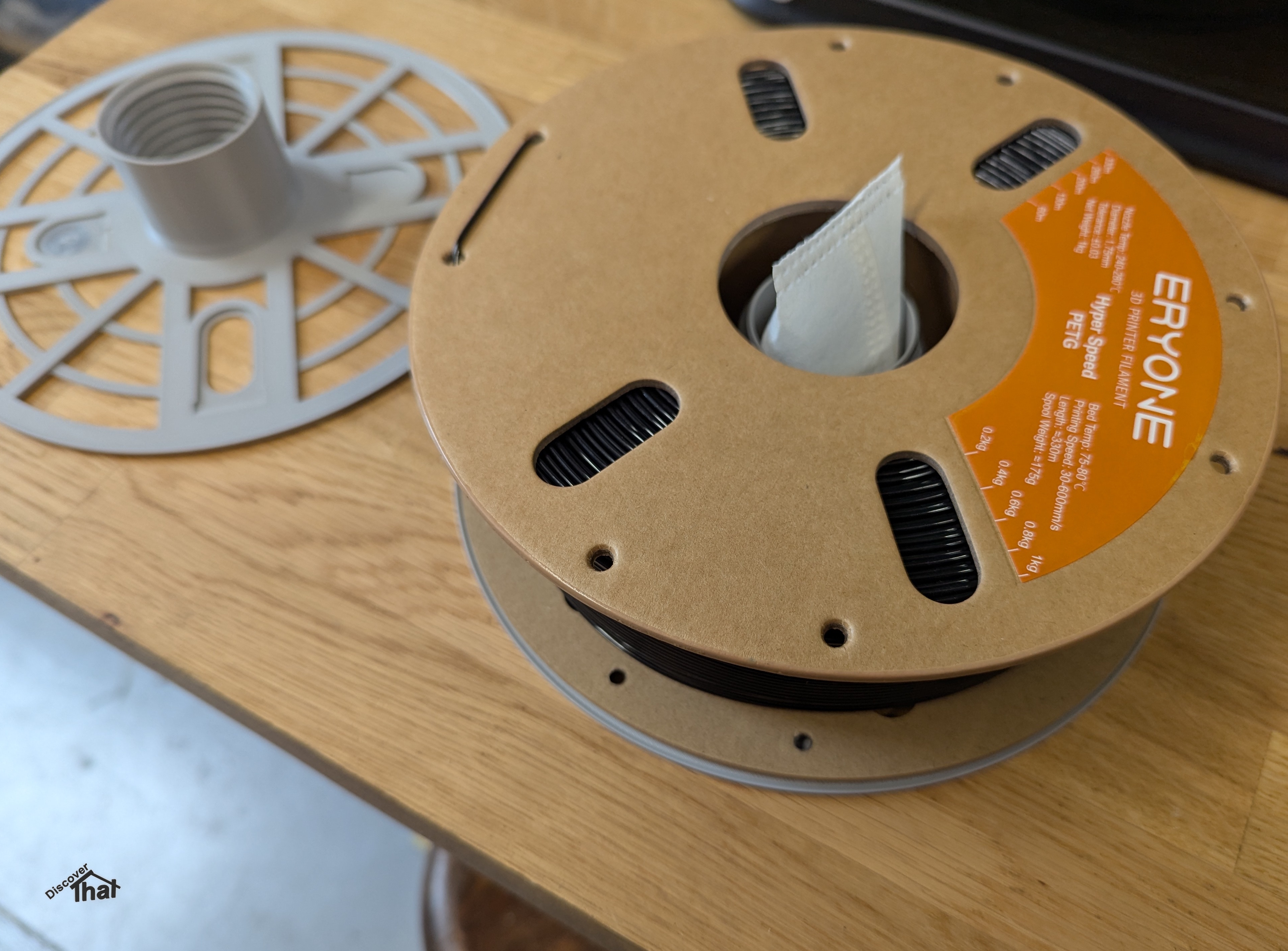
Eryone Hyper Speed PETG


  • Print settings: Same as Bambu Lab PETG-HF.
  • Colours tested: Black and Grey (dark).
  • Print Result: Very Good. No stringing, no blobs, tidy seams.
  • Surface: Gloss.
  • Spool AMS compatibility: Cardboard spool, not recommended. I use a simple workaround.
  • Number of kg spools used: 3.
  • Print fails: None.
  • Eco: Good. Cardboard spool.
  • Cost: ££
==

Deeplee Rapid PETG


  • Print settings: Same as Bambu Lab PETG-HF.
  • Colours tested: Black and Grey.
  • Print Result: Good. Negligible stringing, no blobs, tidy seams.
  • Surface: Satin to gloss.
  • Spool AMS compatibility: Cardboard spool with strengthened edges. Too wide to use my usual adapter. With care the inner core fits perfectly in a Bambu Lab reusable spool.
  • Number of kg spools used: >10
  • Print fails: None.
  • Eco: Good. Cardboard spool.
  • Cost: ££

Tip: When disassembling the spool, take the end of the filament out of the notch and put it back in the notch. This is to make sure it is free to release when needed. I have found that the end of the filament is often too tight a fit in the notch in the cardboard tube and sometimes the AMS is unable to pull it out. When that happens the printer stops with a filament warning.

==

Subjective Views

The results above are my opinions after a relatively limited number of hours printing with each filament. This is not an organised review or test, this is just a reminder to myself of how well filaments have performed for me.

I have printed everything at Bambu Labs defaults for speed and temperature. I have not attempted to establish the fastest speed a filament can print at. I want to be able to print reliably, repeatably and with minimal tinkering.

My only changes have been to affect the strength appropriate to the component I am printing. Things like wall thicknesses and infill densities.


AMS Compatibility

Being easy to use in the Bambu Lab AMS 2 Pro and AMS HT is important for me. In my results above, I am referring to those two AMS's. I have no access to any other AMS's to try them with.

The spools in the AMS's run in a guide. This limits the width the spool can be to about 68mm. There is less than 3mm between the guide and the nearest side of the AMS HT. Although this is not a problem for the spools on their own, it causes me an issue using the adapter that I fit to hold the NFC tags. There is a little more room in the AMS 2 Pro, but not much in some slots.


Cardboard Spools

Cardboard spools are not recommended by Bambu Labs for use in their AMS's. As the cardboard wears on the rollers, the dust formed is not conducive to the operation of the AMS over time. 

Some spool cores conveniently fit the Bambu Labs or other reusable plastic spools. This works well, although I have had some issues where the end of the filament gets stuck between the spool and cardboard core. I try to ensure the end is free when assembling the spool.

For those cardboard spools where the core does not fit in a reusable spool, my preferred solution is to use an overlay spool that sandwiches the entire cardboard spool. The running edge is then plastic. As long as the cardboard spool has an overall thickness of 60mm or less and an overall diameter of 200mm or less, the result fits in the AMS.


Conclusion

All the filaments that I have tried, so far, are good and can be used as direct alternatives to Bambu Lab PETG-HF.


==

This page is updated from time to time when I try new filament. Usually when Bambu Labs are out of stock.

==


Saturday, 24 May 2025

Printing TPU on the Bambu Lab H2D

A friend had need for a replacement drive belt. A good excuse to try out printing with flexible TPU.

The original belt plus the printed TPU belt.

I managed to pick the wettest day in months although luckily the humidity where my printers are only got up to 57%.  I was not expecting great results. I have not attempted to dry the filament. It's new, straight out of the vacuum sealed bag. I have an AMS HT on pre-order specifically for this purpose but that is not here yet and I still wanted to have a go.


I've used Bambu Lab TPU 90A filament through a 0.8mm nozzle, which I will dedicate to only use TPU. They are printed with a 100% rectilinear infill, solid. I've created the model of the belt in FreeCAD and deliberately put a flat base with 45 degree tangential slopes leading into the otherwise 4mm diameter cross section belt. I've sliced this with 99 wall loops so the result is solid and random seam locations for added strength.

There are contradicting instructions on Bambu's site. The filament purchase page in the store saying use glue stick for TPU and the wiki saying don't use glue stick on a textured PEI plate because it might stick too much. 

https://wiki.bambulab.com/en/h2/h2d-tpu-printing-guide


I opted not to use glue stick and I was easily able to remove the printed belt using an old plastic membership card, sharpened at one end. (I've since found that was not necessary.)


Even with a simplified filament path, approximately as instructed by Bambu but without a suitable container, the pull on the new heavy filament spool was greater than I thought suitable. I made a make shift bush out of a pipe but that barely helped. I thought about pulling out the length of filament needed and cutting, so there would be no spool to pull, but my solution for today was that I kept returning to the print while it was in progress to pull lengths of filament off of the spool by hand, so the extruder had minimal resistance.

The results, although not pretty, are very serviceable for the purpose.


This can only get better when more suitable kit arrives.

==


Update:

One of the belts has been put to good use and was left running the machine non-stop for over 2 weeks without an issue. The belt lasted another session before breaking.

Drying:

The AMS-HT arrived shortly after I had done the initial prints. I've now repeated exactly the same prints with thoroughly dried TPU 90A. The results are now perfect. Drying is well worth it with TPU.


I forgot to change the nozzle, so these belts were printed with a 0.4mm nozzle. Luckily, that's OK for TPU 90A. The results are very good.
They came off cleanly from the textured PEI print bed with minimal effort.


==


Sunday, 14 June 2020

AM3300 ColorFabb nGen filament

I have just done my first print with ColorFabb nGen filament.
The results are excellent.


Slightly slower to print with than PLA, I used the recommended 50mm/s for the nGen where I can reliably use 60mm/s with PLA. However, both are much faster than the 30mm/s I have to print with PETG.


I'm using nGen because I want the higher temperature tolerance, so I can use the finished article in a car. I normally use PETG for in car use but, as I've said, that is slow and troublesome.


I did not have any issues with a 25 hour print using nGen. It stuck to the bed without warping and negligible stringing and blobs. Both significant issues with PETG.

nGen is ColorFabb's brand name for "Eastman Amphora™ AM3300 3D polymer" filament.

If it survives the summer temperatures in the car, I think this will be my go to filament for things that need that little extra strength or temperature resistance.

==

Update 25 June 2020

Over the last week or so, I have done a lot of prints using nGen filament. These range from 3 hour to 25 hour prints. I have not had a single failure. Everything sticks to the glass bed, without any assistance. Good layer adhesion. No warping or noticeable shrinkage.
I've had a couple of the prints in a car for a few hot days and no sign of any distortion.

Just based on my feel, I would say that nGen has about the same layer adhesion as PLA but is overall stronger. With the grain, nGen can take quite a lot of flexing, much more than PLA.

The surface finish is good. It gets the odd tiny bobble, which I can usually scrape off with my fingernail. It can have a tiny bit of very fine stringing but that depends on the model being printed, some have none. Again, easy to clean up. I can rub it off between my fingers.

I plan to buy nGen filament as my primary material to print with, from now on.
I have lots of PLA left in stock and a little PETG. I will use that up over time but I'm unlikely to keep much of either going forward.


==


nGen, AM3300, Setting:

Nozzle temperature = 235C

Print speed = 50mm/s

Travel speed = 100mm/s

Cooling = 50%
Bed temperature = 85C


==

Compare Filaments

I have found it difficult to get reliable information about filaments.

The information I am particularly interested in is at what temperature does the material deform. More specifically, will it survive the temperatures inside a car during the summer.
The most appropriate measurement I can find for that is:
Heat Deflection Temperature (HDT). It is when the shape will start to change due to the heat under a given pressure. This is typically quoted at one of two pressures. Either 0.46MPa (66psi) or 1.8MPa (264psi) or both.
That is not the Glass Transition Temperature (GTT), which is always higher.

The following are my own conclusions from various sources.

Generic PLA
Material: Polylactic Acid (PLA)
HDT = 49C to 52C at 0.46MPa 
Reliable print speed: 60mm/s
Comment: Easy to print with.

ColorFabb nGen
Material: Eastman Amphora™ AM3300
HDT = 71C at 0.46MPa and 63C at 1.8MPa
Reliable print speed: 50mm/s
Comment: Easy to print with. Stronger than PLA but not as strong as PETG or ABS.

ColorFabb XT
Material: Eastman Amphora™ AM1800
HDT = 70C at 0.46MPa and 62C at 1.8MPa
Suggested print speed (mid range): 40mm/s
Comment: I have not tried this. Apparently, another one that is more difficult to print with.

ColorFabb HT
Material: Eastman Amphora™ HT5300
HDT = 
Suggested print speed (mid range): 40mm/s
Comment: I have not tried this. Although tough it is apparently more difficult to print with.

Generic PETG
Material: Polyethylene Terephthalate Glycol (PETG)
HDT = 63C at 1.8Mpa
Reliable print speed: 30mm/s
Comment: Difficult to print with. Strings and blobs easily form and the nozzle gets covered in filament, requiring cleaning.

Generic ABS
Material: Acrylonitrile Butadiene Styrene (ABS)
HDT = 88C to 100C (1.8MPa)
Suggested print speed (mid range): 60mm/s
Comment: I have not used this due to the well documented fumes. I am confident they will, at the very least, irritate me but more likely, cause me harm.


==

Sources:

==

Friday, 19 April 2019

Mini filament review

For the last couple of days I have been printing some signs.
They are mainly flat with raised lettering.

Due to various failures I have been trying different types of filament among other things to fix the issues.


The results have led to some conclusions and preferences.

Filament choices in order of preference:

Rigid.ink PLA Plus
This is the best at the job so far. It stays flat on the glass with no warping even on the largest size flat prints.
It's not perfect though. The end of the spool is wound so tightly that the Ultimaker 2+ extruder struggles to get the last half dozen layers of coils off of the spool. That's a lot of wasted filament!
My guess is that the tight loops press against the inside of the Bowden tube so I can't even use it loose from the spool.
Heated to 225C with the bed at 45C.
The results have a nice tidy surface finish with sharp edges.
Takes spray paint well.
Update: Rigid.ink is no longer available. They suggest trying https://shop.3dfilaprint.com. I have used them before but have not got any in stock to try out. I'll update this article when I have tested some.
I'll probably try their Premium PLA:
https://shop.3dfilaprint.com/filaprint-black-premium-pla-285mm-3d-printer-filament-1380-p.asp


ColorFabb PLA/PHA
This was a lot better than standard PLA. It stayed flat on most prints with only a slight tendency to curl.
I get best result running it hotter than the suggested.
For me I heat to 215C with the bed at 60C.
The surfaces are nice and tidy. The raised details have a very slight bulge at the corners. If I was not comparing to other prints I would not have noticed.
When spray painting it is obvious the surface is porous along the print lines.

3DFilaPrint.com PLA
This would not stay flat. Even before it had done the third layer the edges of the brim were curling up and by the time the print had finished, the main body had lifted by a couple of millimetres at several corners.
I've used this successfully on other prints. It just does not like the thin flat prints.
Printed at 210C with the bed at 60C

Inconsistent Information
Several of the manufacturers provide guides or printed temperature ranges on their boxes. This information often changes. One manufacturer has three different heated bed temperature suggestions for the same filament, one on their web site, a different figure on a card supplied in the box and yet another range on the side of the box!

I no longer take the instructions as fixed rules. I use the suggestions as a guide to get me in the right direction. Trial and error is the only sure way.

==

Glass Thickness

As far as fixing the various issues, I think the glass is the main problem.

One of the problems is that the prints would warp. This always started in the rear right corner. For many prints that was the only issue but invariably the print would lift so high it would impede the print head and ruin the print.

I can only assume there is a slight inconsistency in the glass thickness. If I avoid printing on the rear right quadrant of the print bed, I get much more reliable results.
The affected area extends about 50mm from the right hand edge to about half way forwards from the back edge.


I managed to avoid this by rotating the largest prints and they have all worked since.

I plan to experiment with bed levelling to see if by deliberately setting a greater distance at the front left corner I can get better reliability at the rear right.

==

Worn Nozzle

Before I was able to get anything working I had to replace the nozzle.
The filament would flow for a while then get straggly. Small blobs every few millimetres with thin thread like strands between!

I don't know if the hot end nozzle was contaminated or worn but after I replaced it the flow was even again.

==

Printed with Thicker Layers

In the past I have found that thicker layers are troublesome. Now that I have done some more trials, I am able to successfully and reliably print with the following settings:
Nozzle: 0.4mm
Layer height: 0.24mm
Edge, top and bottom thickness: 1.2mm
Print speed: 60mm/s
Travel speed: 120mm/s
Adhesion: 7mm brim
Bed: Glass with hairspray (once in a while)


Rules of Thumb
I found on an Ultimaker forum, a rough guide to layer thickness and print speeds.
This approximately lines up with my experience, so I will use it from now on, rather than my usual guess work.

Maximum layer thickness: 3/4 of the nozzle diameter
e.g. 0.4mm nozzle can print a layer up to 0.3mm thick.

Maximum speed
The maximum print speed is determined by how fast the filament extruder can feed.
Stock Ultimaker 2 extruder, maximum throughput of 2.85mm filament: 7mm3/s

Calculation: Nozzle diameter x layer height x speed = throughput area
e.g. 0.4mm x 0.3mm x 40mm/s = 4.8mm3/s
Maximum speed calculation = Maximum throughput / (nozzle diameter x layer height)
Therefore the maximum speed is likely to be:
7mm3 / (0.4mm x 0.3mm) = 58mm/s

I have an Ultimaker 2+. According to the Ultimaker web site, the Ultimaker 2+, can print up to 16mm3/s with a 0.4mm diameter nozzle. It has a maximum travel speed of 300mm/s.
In theory, therefore, I could double the above speeds. In practice I have not been able to a achieve speeds much faster than the above calculations.
I tried, just as a double check. 0.4mm nozzle, 0.24mm layer and 90mm/s at 210C with PLA = 8.6mm3/s. It came out lumpy and did not stick to the bed properly.
The kit was clearly capable of pushing it at that speed but it would need a lot more tinkering to get close to something usable.


Nozzle Temperature
The hot end temperature is far more trial and error. That is partly because the thermostats in the printers are not that accurate.
Most manufacturers recommend starting at the low end of their suggested range of temperatures and work up.
According to most vendors, 2.85mm diameter filament tends to need to be about 5C hotter than 1.75mm filament for the same speed, so for a standard Ultimaker, which uses 2.85mm filament, start at 5C above the manufacturers suggested lowest temperature.
Increase the temperature for faster throughput. Alternately, it would be simpler to increase the speed for lower layer heights so the throughput is always roughly the same area per second, therefore the temperature could remain the same for all prints.

==